Chat Minimap
Long conversation. Clear perspective.
AI conversations can become working spaces. An idea turns into a question, the question leads to an experiment, and a useful answer ends up several screens behind you. The conversation keeps moving. Finding your way back takes more effort than it should.
I built Chat Minimap to give those conversations a little perspective. A map alongside the chat makes it easier to see the turns, return to an earlier exchange, and keep track of where you are.
It is an evolving HyperKode browser extension for ChatGPT and Claude: a practical tool and an exploration of how we read, organize, and reuse conversations with AI.
Install from the Chrome Web Store ↗
A way back to the useful parts
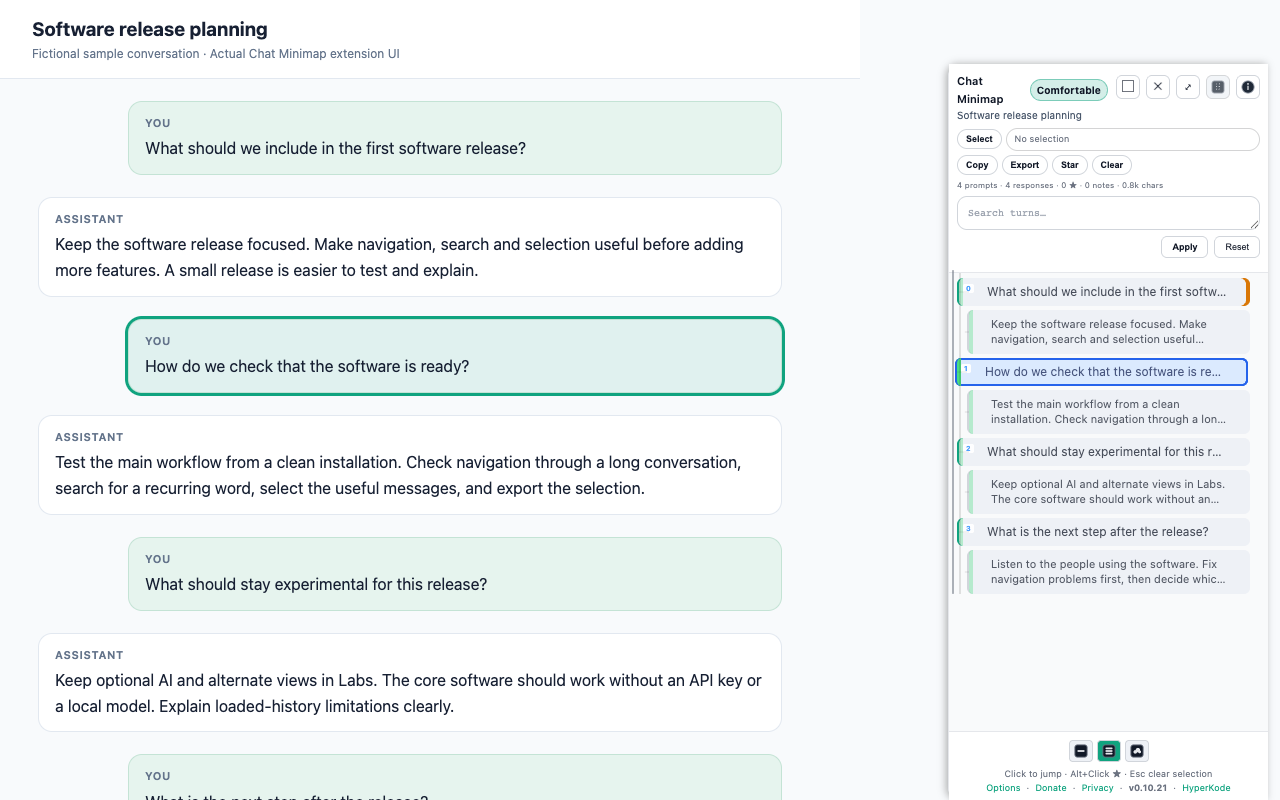
The minimap gives the chat an overview without replacing the original conversation. Jump between prompts and responses, search or filter the turns, and mark useful passages with stars and notes. Turn sets let you keep related exchanges together.
Selection and position are separate: a blue row keeps the turn you selected, while an amber marker follows your position as you scroll. You can explore without losing track of the passage you meant to return to.
When you want to carry something forward, copy or export a focused selection, a filtered view, or the discovered conversation as Markdown, JSON, or plain text. What is available depends on what the chat site has loaded.
From a question to a report you can keep
With AI enabled and a provider configured, AI Search can answer questions about the discovered conversation and point back to supporting turns. Summarize works with a selection or the current filtered view, so you can focus on the exchanges that matter.
Copy or export an AI Search answer as a Markdown report. It includes the question, answer, model, and cited source turns when available, with runtime and token information when supplied. Related turns are shown separately when there are no cited sources. An answer without grounded citations is labeled advisory; it should not be treated as supported evidence.
These features use the conversation content the extension has discovered, not a guaranteed complete history. AI starts off and remains optional. Review the answer against its sources; a citation or confidence indicator does not prove correctness.
How the pieces fit together
Read the page, build a map
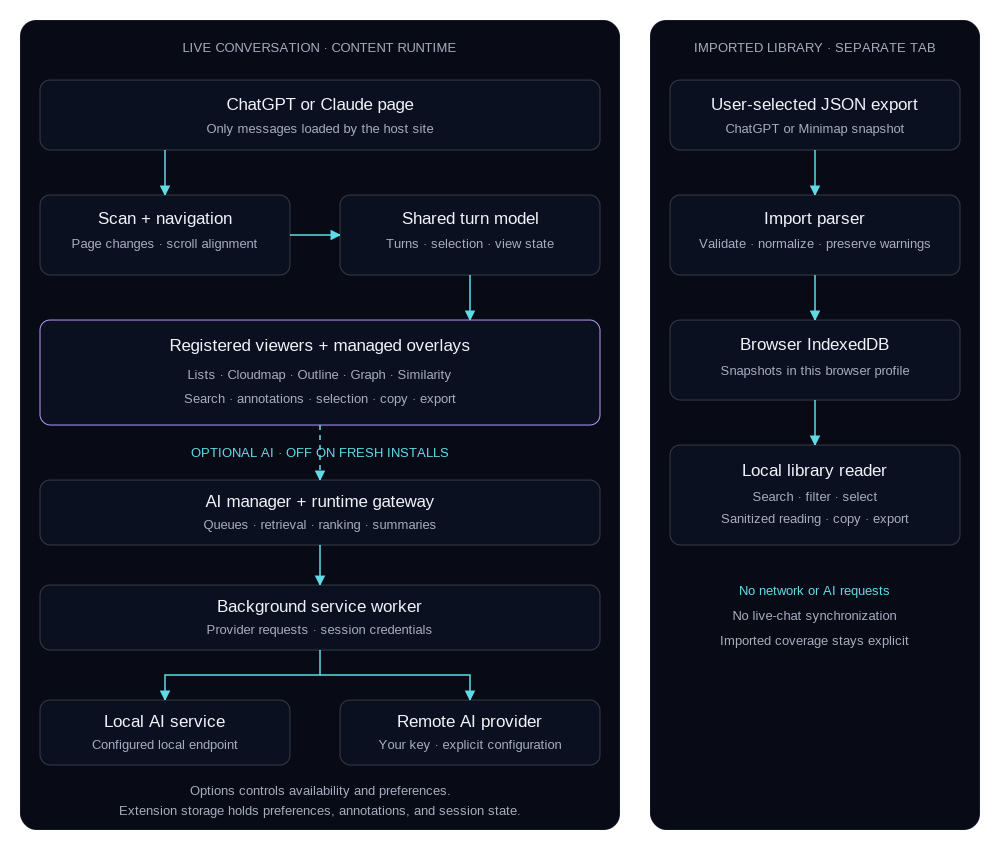
The extension reads loaded messages in the browser page and builds a local model of the conversation’s turns. The panel, filters, and navigation use that model. As replies stream in or the site replaces parts of the page, scanning and navigation controllers update the map and reconnect it to the messages.
Viewers: different ways to read the same conversation
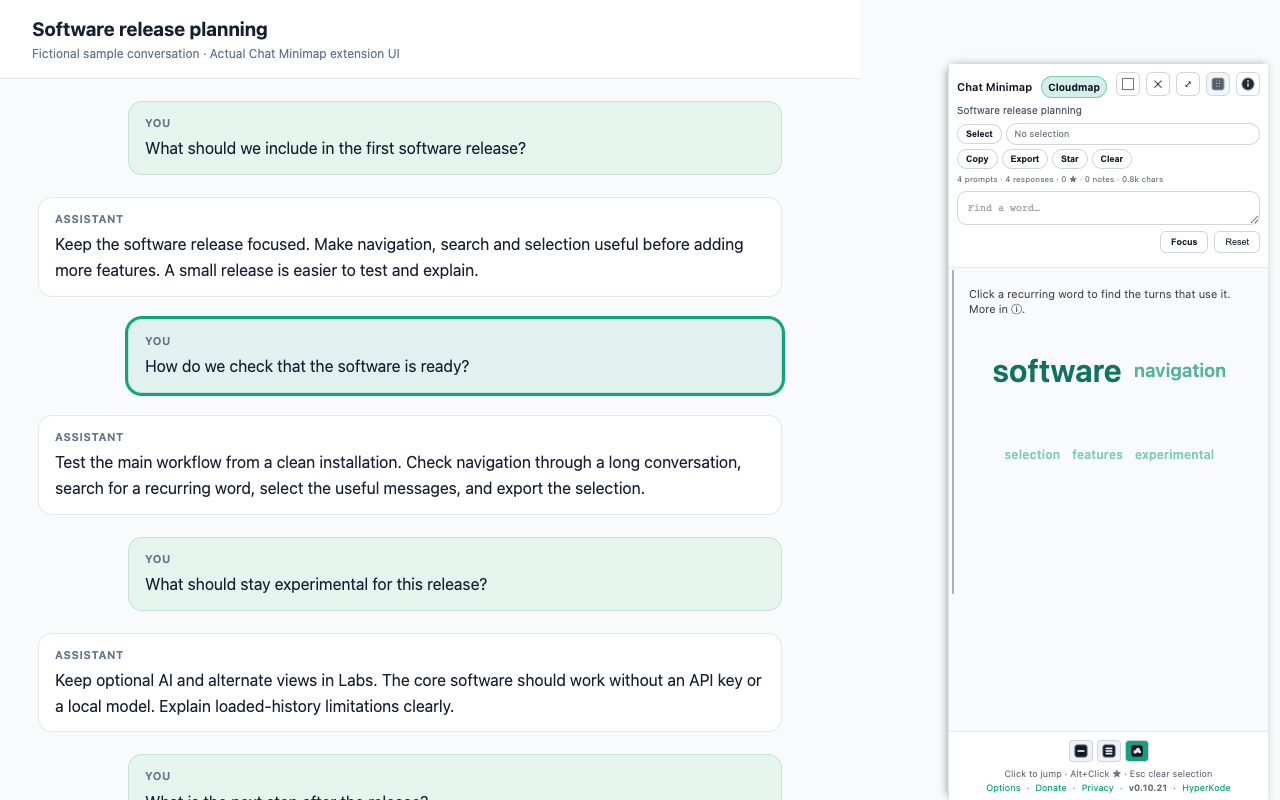
A viewer changes how the conversation is presented. Minimal and Comfortable keep the turns in a readable list. Cloudmap shows recurring words that you can use to find the exchanges behind them. Outline, Graph, and Similarity (Global) are optional Labs views for exploring structure and relationships.
Graphs as a tool for exploration
Graph view makes the relationships navigable. Timeline follows the sequence of turns; Segmented uses topic groupings when available. Pan, zoom, and selection help you explore the graph and return to the corresponding exchanges. Entity generation adds another layer of people, concepts, and relationships, with references back to the turns they came from.
Structural graph navigation works without AI. Generating entities needs an enabled, configured AI provider; similarity links also depend on embeddings and their settings. Opening Graph does not automatically generate those results, and generated relationships still need a reader’s judgment.
Overlays: another layer of context
An overlay adds information alongside the conversation rather than replacing its viewer. Thread Tree explores thread structure without AI. The experimental Semantic Drift and Sentiment/Tone overlays explore changes in meaning or tone and depend on the relevant AI features and settings. These are reading aids, not definitive interpretations of what someone meant.
A framework for trying new ideas
Viewers and overlays are registered components with a name, defaults, requirements, and a defined lifecycle. Viewers handle presentation; overlays receive conversation data and viewport context, render their layer, and clean up when switched off. Shared controls expose the available components in Options.
This gives me a way to add custom viewers and overlays without rebuilding the whole extension. A new component still needs an implementation, registration, packaging, and testing. It is an internal development framework, not a public plugin loader or a way to install arbitrary code from the web.
A separate library for saved conversations
The Imported conversation library opens in its own extension tab. Import a supported ChatGPT or Minimap JSON export, search across imported conversations, select messages, and export the parts you want to keep. Snapshots are stored in this browser profile using IndexedDB, a browser database.
This library is separate from the live-page minimap. Imports are snapshots, not a live connection to the original chat. The library makes no network requests and does not send imported content to AI providers. Partial exports remain partial; clearing extension data removes the stored library, so keep the original files.
Useful without AI, with room to experiment
Core navigation, text search, filtering, and export run locally without an AI service. AI features start off and are optional. When enabled and configured, they can assist with summaries and AI Search. The architecture supports a local model service or a supported remote provider using your own API key.
Provider requests go through the extension’s background service worker. Remote AI can send relevant conversation content to the provider you choose; local processing and remote processing are different choices. Options → Labs is where the optional features are configured.
Behind the project: an evidence-based health report
Building Minimap also means understanding how it is doing. A separate private tool reviews aggregate Chrome Web Store metrics: installs, uninstalls, users, and listing traffic. It keeps dated evidence, checks coverage and freshness, and produces a report with findings that can be traced back to their sources. Missing data stays missing.
An optional local AI review helps prioritize findings and suggest read-only checks. Code calculates the facts and sets the report status; the model cannot override that assessment. If local AI is unavailable, the report keeps its rule-based findings. A separate private MCP connection lets me review the aggregate evidence in ChatGPT and ask what changed since the last review. Evidence returned there enters the hosted conversation.
This is an operator tool, separate from the installed extension. It does not collect conversations or measure how people use individual Minimap features. Store activity can raise questions about acquisition, but it does not establish why someone installed the extension or whether an account is secure. Security remains unassessed by this report.
Working with a changing page
ChatGPT and Claude control which messages are loaded. Older turns may appear as you scroll, and an unloaded message may need to be loaded again before the extension can navigate to it. The live map is an overview of discovered content, not a complete archive.
Site layout changes can affect compatibility. A layout warning offers Retry and Copy diagnostic when detection appears incomplete. Diagnostics contain the site name, extension version, and message counts, not conversation text. They stay local until you choose to copy and share them. AI-generated interpretations also need your judgment; they can miss context or get things wrong.
Built by Carlos Enrique Ortiz · HyperKode. Questions: enrique.ortiz+hk@gmail.com.